Disclosure: This post contains affiliate links. If you sign up through them, I may earn a commission at no extra cost to you.
This is Part 2 of my Muse review. If you want the bigger picture first, read Part 1: Can Muse Replace My Entire AI Stack?
I ghost people by accident.
Not because I do not care. I am just a terrible texter.
Replying means stopping what I am doing, switching mental gears, figuring out what to say, sending the message, and then trying to get my brain back into whatever I was doing before. And the worst part is that it can easily take me another 20 minutes to fully get back on track.
So I tell myself I will answer later.
Sometimes later is a few hours. Sometimes it is a few days.
And once enough time passes, the problem changes. It is no longer, “I need to text them back.” It becomes, “Oh no. Now it has been too long.”
Then comes the guilt trip, which naturally makes me want to avoid the text even longer.
My birthday was the perfect example
I had a bunch of really sweet birthday messages sitting unanswered. Not because I did not appreciate them. I did. I was just in the middle of other things, and I did not have the mental bandwidth to stop, switch gears, and come up with a thoughtful response to every single message.
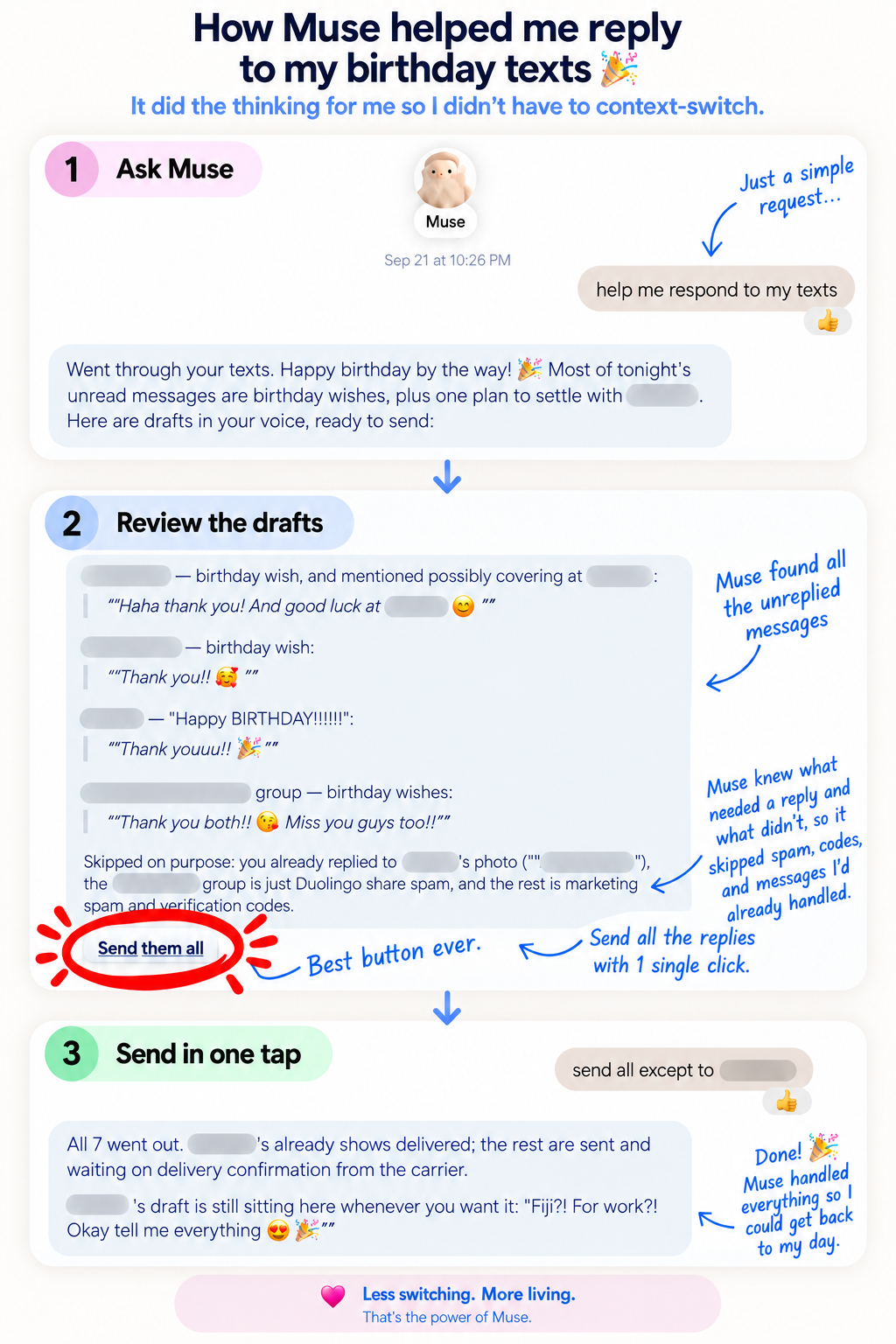
So I asked Muse to help me respond to my texts.
And this is the part I have honestly been waiting for from AI.
Muse did not just draft a text. It handled the whole annoying part.
Muse went through my messages and figured out which ones actually needed a response. It did not just treat every recent message the same. It could tell the difference between something I needed to answer and something that did not need another reply.
Then it drafted the responses for me in context.
I could review them, make changes if I wanted, and then there it was:
Send them all.
One click. Best button ever.
The hard part was never typing
I realized my problem was never that I did not have 30 seconds to physically type a text. The hard part was all the thinking around it.
- Stop what I am doing.
- Read the message again.
- Figure out the right tone.
- Think of something that does not sound weird.
- Reply.
- Try to remember what I was doing before.
If I use another AI tool to help, there are even more steps. Open the AI. Give it context. Generate the reply. Copy it. Switch to Messages. Find the conversation. Paste it. Edit it. Send it. Repeat.
Muse takes the thinking step off my plate and gets much closer to actually finishing the task.
It even helps with the guilt spiral
This might be the part that makes me happiest.
If I have waited too long to answer somebody, I tend to make the situation worse in my own head. Now I am not just figuring out how to respond. I am also figuring out whether I should apologize for taking three days, how much I should acknowledge it, and whether the other person thinks I disappeared off the face of the earth.
Muse helps me get past that little guilt spiral too.
Which is honestly a very specific problem I did not expect an AI assistant to solve for me, but here we are.
And I do not have to switch to Android
I have waited so long for something like this because the Apple ecosystem has made this kind of workflow frustratingly difficult. Plenty of AI tools can help me write a message. Very few can help me move from “I should reply to these people” to actually getting those replies handled without a pile of extra steps.
I had genuinely started wondering whether better AI automation was eventually going to make me consider switching to Android.
Apparently I do not have to.
And yes, that makes me ridiculously happy.
⚡ Stop Ghosting: Automate Your Communication
AI assistants help draft individual replies, but if you want to permanently stop feeling guilty about unread inboxes and neglected contacts, you need automated systems. I use Kit to build simple email sequences that keep my community engaged without me having to remember to check an inbox every single day.
The Free Tier: Host up to 10,000 subscribers, send weekly broadcasts, and build unlimited forms with zero monthly fees.
And if you want to see what else I have been testing, Part 1 of my Muse review is here.



Leave a Reply